# Managing resource utilization and server monitoring in AWS

## **Prerequisites**

1. You should know the concepts and commands of Linux.
2. Basic understanding of Virtual machines, ports, volumes and authentication in cloud.

## **AWS EC2 Instance**

EC2 - Elastic Compute Cloud is a virtual server that runs on the cloud which can be opened by anyone over the internet provided the user have proper authentication to access.

***Let's spin up an AWS EC2 instance.***

1. Login to AWS console and navigate to EC2.

<figure><img src="https://389859271-files.gitbook.io/~/files/v0/b/gitbook-x-prod.appspot.com/o/spaces%2FR9yUYsBi0Y1eeEpTEqSa%2Fuploads%2FXXWSr93hvQDqcDBUm8hk%2Fimage.png?alt=media&#x26;token=1daeff20-94de-463b-bc14-5a41069a582e" alt=""><figcaption></figcaption></figure>

2. Click on Launch instance to create a new EC2 instance.

<figure><img src="https://389859271-files.gitbook.io/~/files/v0/b/gitbook-x-prod.appspot.com/o/spaces%2FR9yUYsBi0Y1eeEpTEqSa%2Fuploads%2Fj6ITIP99qrYct99nnHy5%2Fimage.png?alt=media&#x26;token=a171bff4-e3a0-405b-be15-c095450c7ed0" alt=""><figcaption></figcaption></figure>

3. Provide the Instance name.

<figure><img src="https://389859271-files.gitbook.io/~/files/v0/b/gitbook-x-prod.appspot.com/o/spaces%2FR9yUYsBi0Y1eeEpTEqSa%2Fuploads%2FtZ8mENOjedYuxBCT7pLq%2Fimage.png?alt=media&#x26;token=90893ff1-d348-4e18-b513-8cc9021898fa" alt=""><figcaption></figcaption></figure>

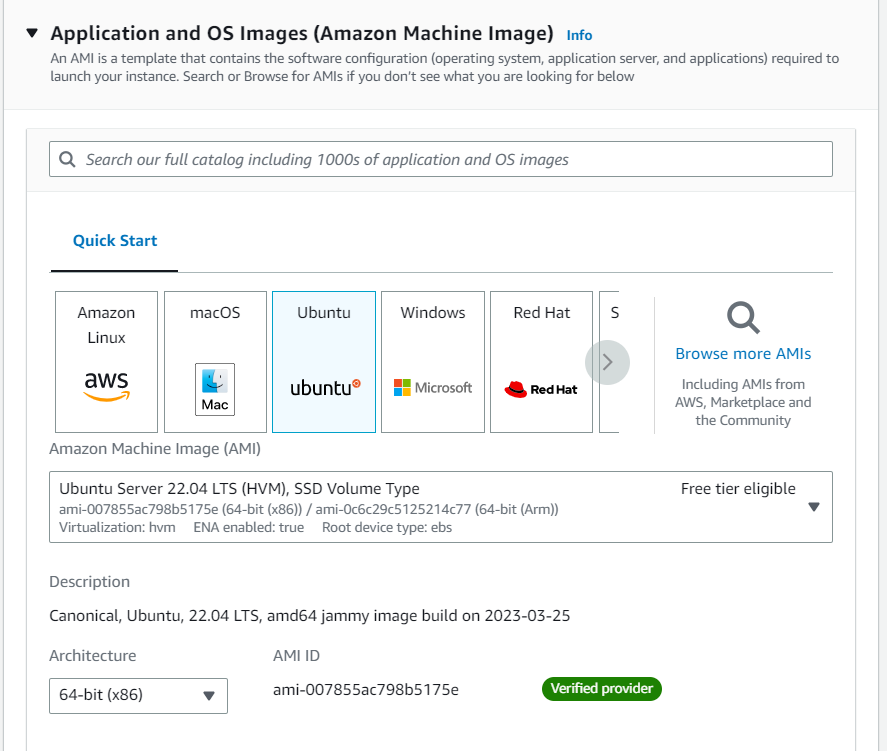
4. Choose the OS image that you need to have in your server. In this project I am going to use Ubuntu.

<figure><img src="https://389859271-files.gitbook.io/~/files/v0/b/gitbook-x-prod.appspot.com/o/spaces%2FR9yUYsBi0Y1eeEpTEqSa%2Fuploads%2F5COr2aVdUl2KMqp60BAi%2Fimage.png?alt=media&#x26;token=1e654705-376d-480c-a061-0ea7e7fc0954" alt=""><figcaption></figcaption></figure>

5. Choose the instance shape and size required according to the project specification.

<figure><img src="https://389859271-files.gitbook.io/~/files/v0/b/gitbook-x-prod.appspot.com/o/spaces%2FR9yUYsBi0Y1eeEpTEqSa%2Fuploads%2Fdh45KIoEx7MBDrcbfcAn%2Fimage.png?alt=media&#x26;token=ecb2dbae-035b-44f5-93e2-3beaf7f5ab75" alt=""><figcaption></figcaption></figure>

6. Proper authentication to the server is mandatory. Therefore we need to create a private key for the server.

<figure><img src="https://389859271-files.gitbook.io/~/files/v0/b/gitbook-x-prod.appspot.com/o/spaces%2FR9yUYsBi0Y1eeEpTEqSa%2Fuploads%2FhAVhoNGeVV75fCeseda7%2Fimage.png?alt=media&#x26;token=5b28d6c9-5c82-4304-b7b5-73273804aff8" alt=""><figcaption></figcaption></figure>

<figure><img src="https://389859271-files.gitbook.io/~/files/v0/b/gitbook-x-prod.appspot.com/o/spaces%2FR9yUYsBi0Y1eeEpTEqSa%2Fuploads%2FHmT8WDWClcrYtHW0Qsww%2Fimage.png?alt=media&#x26;token=a9d7eb1e-f7ed-45e7-988e-d535dc9cf506" alt=""><figcaption></figcaption></figure>

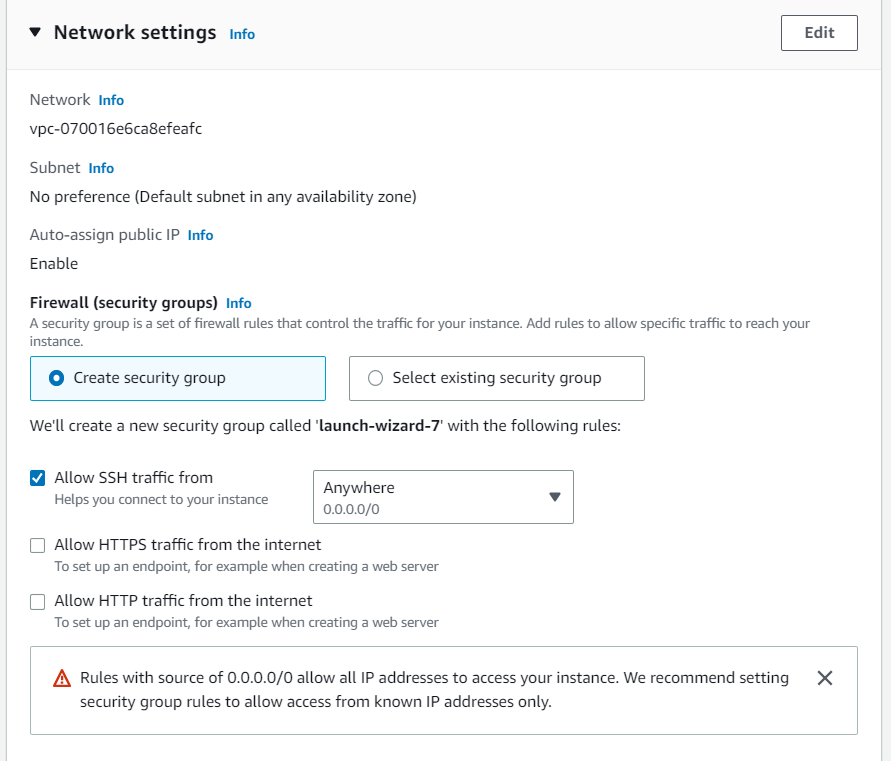
7. Choose the appropriate setting of security group according to the project requirement. In this project we are going to use normal workflow.

<figure><img src="https://389859271-files.gitbook.io/~/files/v0/b/gitbook-x-prod.appspot.com/o/spaces%2FR9yUYsBi0Y1eeEpTEqSa%2Fuploads%2FdVkHczMH1leS1at8Lft2%2Fimage.png?alt=media&#x26;token=af74dd1c-3089-421e-9e60-d0ba2f290a82" alt=""><figcaption></figcaption></figure>

8. Choose the appropriate size of the volume needed in the server. Here we have a standard default requirement. Finally click on **Launch instance**.

<figure><img src="https://389859271-files.gitbook.io/~/files/v0/b/gitbook-x-prod.appspot.com/o/spaces%2FR9yUYsBi0Y1eeEpTEqSa%2Fuploads%2FH4CALJOW0NtTcrFKF12E%2Fimage.png?alt=media&#x26;token=b6ba014a-5fd2-49d7-b4aa-92593a796451" alt=""><figcaption></figcaption></figure>

9. Now the instance is running.

<figure><img src="https://389859271-files.gitbook.io/~/files/v0/b/gitbook-x-prod.appspot.com/o/spaces%2FR9yUYsBi0Y1eeEpTEqSa%2Fuploads%2FquehVjCudedHvc7f89yu%2Fimage.png?alt=media&#x26;token=a7a2bc67-9ee0-48e4-8a1e-5fcc9646b352" alt=""><figcaption></figcaption></figure>

10. You can access the instance through AWS EC2 Connect which is the most common way.

<figure><img src="https://389859271-files.gitbook.io/~/files/v0/b/gitbook-x-prod.appspot.com/o/spaces%2FR9yUYsBi0Y1eeEpTEqSa%2Fuploads%2F7MeyGdounvJoG9aYXRgh%2Fimage.png?alt=media&#x26;token=9e06612e-3ec6-4547-829c-c1783c917f8e" alt=""><figcaption></figcaption></figure>

<figure><img src="https://389859271-files.gitbook.io/~/files/v0/b/gitbook-x-prod.appspot.com/o/spaces%2FR9yUYsBi0Y1eeEpTEqSa%2Fuploads%2FTNs37anxmLd2z3ussaAA%2Fimage.png?alt=media&#x26;token=f501db2a-c135-4baa-abff-a97776d44769" alt=""><figcaption></figcaption></figure>

Now, Let's step forward to build our project.